Hello folks! Our journey through the basic Trench Crusade rules is at its turning point. Today we round the Core Rules up by talking about Keywords.
An important part of the game, Keywords condense and streamline the rulebook and the profiles of units and items by referencing to shared universal rules. That’s why in my opinion they deserve a section on their own in our analysis of the Trench Crusade rulebook. For my analysis I found it helpful to divide the keywords in 4 broad categories depending on how they interact with the various game elements. Thus we have keywords that only define which category a model belongs to, without referring to particular rules, keywords that serve as a reminder of general rules, and keywords that introduce additional, commonly shared, rules for items and models respectively, plus a few keywords that specifically apply only when making attacks.
Tag Keywords
These keywords don’t usually have any bespoke rules attached to them: they only serve to describe which categories or faction the model belongs to. BLACK GRAIL, HERETIC, PILGRIM, NEW ANTIOCH, SULTANATE and THE COURT define the model’s faction, while ARTIFICIAL, DEPLOYABLE and ELITE have interactions with some in-game or warband building rules that explicitly refer to them but bring no intrinsic special rule.
Note: the “Artificial Life” rule of the Artillery Witch and the “Artificial Body” rule of the Sultanate Takwin creatures only share the word “Artificial” with the keyword. It’s important to remind that the ARTIFICIAL keyword, by itself, is just a descriptor and in no way implies that the model possessing it has any of the aforementioned rules.
General Rules Keywords
Keywords such as ACTION, +/-DICE, +INJURY DICE and +/- INJURY MODIFIER are used throughout the game to describe general actions a model can take and their eventual modifiers, if any. Similarly, BLOOD MARKER, BLESSING MARKER and INFECTION MARKER are common keywords that refer to core rules and game concepts associated to those markers.
We’ve already thoroughly described how ACTIONS and their modifiers work in a previous article, so we won’t delve much into them now. We’ll just remind that whenever an ability or effect during the game requires a model to generically “take an ACTION” without specifying a particular type of ACTION (e.g. “take a Ranged Attack ACTION”), then it means that the model has to roll on he Action Success Chart, with the effects of the ACTION in case of success or failure described in the text.
Item Keywords
These are keywords that describe or summarize the properties of certain items:
AMMUNITION (KEYWORD): If a model has a piece of Battlekit with this Keyword, it will use it in the next game that it takes part in. When the model is deployed, say which Ranged Weapon the Battlekit will be used for. It gains the (KEYWORD) until the end of the game. The Ranged Weapon you choose cannot already have the BLAST, FIRE, GAS, or SHRAPNEL Keywords, and cannot have more than one type of AMMUNITION.
The AMMUNITION keyword represents special ammunition that can be used on a Ranged Weapon (not a Grenade) the model has to add a keyword effect (such as FIRE, +1 DICE or ARMOUR-PIERCING) to that weapon’s attacks (including any attack made in Melee by a dual-purpose weapon such as a Pistol). With the notable exception of those used by the Iron Sultanate, most Battlekit with the AMMUNITION Keyword also has the CONSUMABLE Keyword, therefore needing to be replaced after each battle in a Campaign.
ASSAULT: Ranged Attacks made with Weapons that have this Keyword do not prevent a model from taking a Charge or Fight ACTION during the same Activation.
A model armed with a ranged weapon with the ASSAULT Keyword is allowed to make a Shoot ACTION with that weapon and Charge or Fight in the same activation. This is regardless of the order of those ACTIONS: the most common use is to make a Shoot ACTION with the ASSAULT weapon before the Charge, but Charging, dispatching the enemy with a Fight ACTION and then making a Shoot ACTION is also possible.
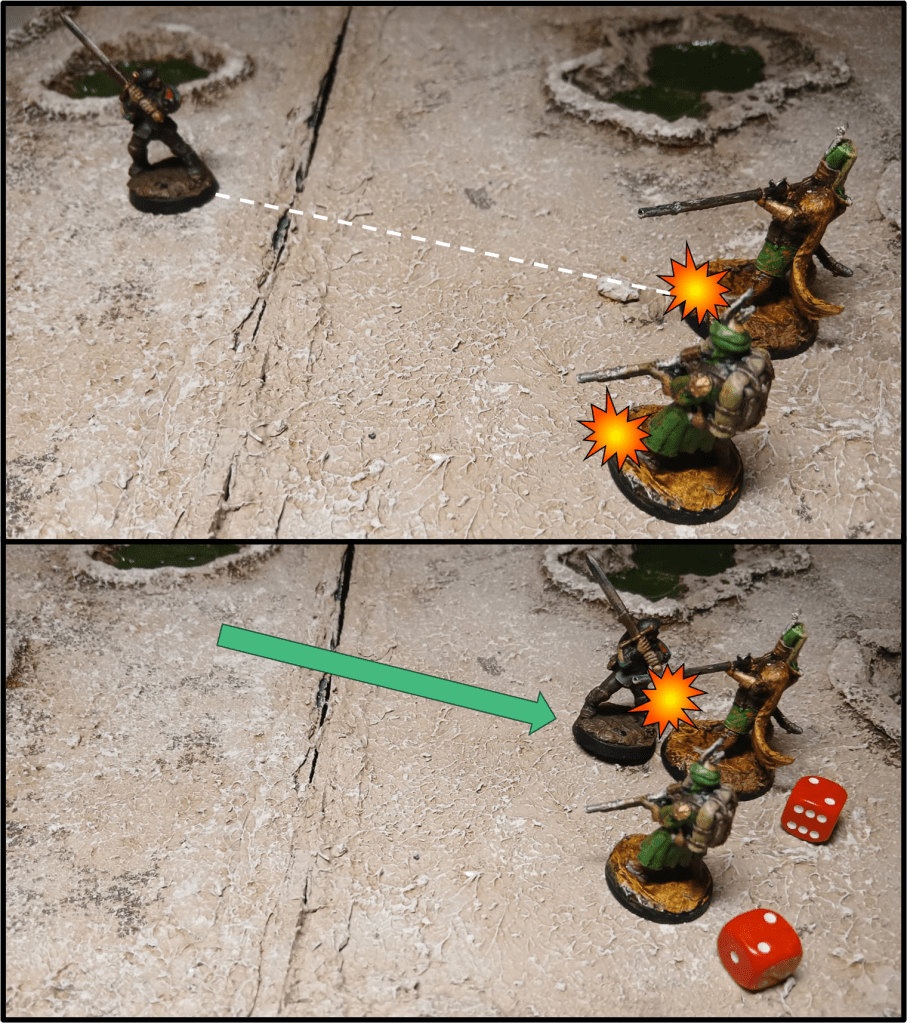
AUTOMATIC(X): You can make a number of Ranged Attacks with this weapon equal to X, one after another. The attacks can target different enemy models, as long as they are all within 6" of each other. Resolve each attack one at a time using steps 2 to 6 of the Ranged Attack Sequence. Any BLOOD MARKERS that are spent only modify the Injury Roll for the attack they are spent on, and do not modify Injury Rolls for subsequent attacks.
As we have already seen in our article about Combat, AUTOMATIC weapons allow a model to make multiple Ranged Attacks in the same Shoot ACTION. Note that this combines with the ASSAULT keyword so a model can use the full AUTOMATIC capacity of its ASSAULT weapon and Fight or Charge in the same activation. Also remind that AUTOMATIC only works with Ranged Attacks, so an Automatic Pistol used in Melee won’t be able to fire twice. The same is true with any AUTOMATIC weapon used to make a Melee Attack with the Point Blank skill.
BLOCK: Add -1 DICE for Melee Attacks targeting a model with this Keyword, or that has a Weapon that has this Keyword, if the attacker made a Charge ACTION before making the attack this round.
Items with the BLOCK keyword, such as Polearms, provide a defensive bonus against Melee Attacks from models that charged in the same turn. This can stack with other modifiers like FEAR and COVER.
CLEAVE (X): When you take a Fight ACTION and choose a Weapon with this Keyword to make a Melee Attack, you can make a number of Melee Attacks with this Weapon equal to X, one after another. The attacks can target different enemy models if desired. Resolve each attack one at a time using steps 2 to 4 of the Melee Attack Sequence. Any BLOOD MARKERS or BLESSING MARKERS that are spent only modify the Injury Roll for the Melee Attack they are spent on.
CLEAVE is the Melee equivalent of AUTOMATIC, allowing a model to make multiple Melee Attacks with the same weapon. When fighting with two different melee weapons, if any of those has CLEAVE, the controller of the model chooses one weapon to be used first and resolves all the attacks made with that weapon, then all the attacks for the second weapon are resolved with the Off-Hand Penalty.
Note that when an enemy model retreats, a model that has a weapon with CLEAVE can use it to make more than one Melee Attack against the retreating enemy due to the fact that it is allowed to make a Fight ACTION.
CONSUMABLE: In a campaign (▶ see Campaign Rules) Battlekit with
this Keyword is lost at the end of a game in which it is used.
CONSUMABLE items can be divided in two categories: those who have a one-and-done effect, as described in their rules (e.g. the Satchel Charge: hit or miss, once you throw it it’s gone) and those who have effects that can be used at the beginning of the battle and last for the whole game, like for example Incendiary Ammunition. If you activate one of those effects during the pre-battle sequence, the item is considered expended, even if you don’t actually get to use its benefit during the battle.
CUMBERSOME: Weapons with this Keyword require two hands to use, even if the model has the STRONG Keyword. However, they can still be used alongside a Shield with the Shield Combo stipulation.
CUMBERSOME weapons always count as two-handed regardless of whether the model is STRONG or not, not allowing the model to use them together with an off-hand weapon. They can’t also be used with a shield (unless they also have the Shield Combo stipulation). This keyword is mostly seen on defensive weapons like Polearms, Halberd-Gun or the Lochaber Axe, weapons that come in a pair such as Tartarus Claws, or weapons that would be unpractical to wield one-handed, for example the Prussian Tank-Splitter Sword or the trusty Bayonet.
HEAVY: A model cannot be equipped with more than one piece of Battlekit with this Keyword and it does not receive a Charge Bonus when it makes a Charge Move. In addition, if a Ranged Weapon or Grenade has this Keyword, you cannot use the Weapon or Grenade to make a Ranged Attack and take a Move, Charge or Retreat, or Dash ACTION with the attacking model as part of the same Activation.
A non-STRONG model carrying an HEAVY item always suffers the restriction to the Charge bonus, regardless of the nature of the item, while a model carrying a HEAVY melee weapon would be able to use any movement ACTION and Shoot in the same activation. This includes a Charge (with no movement bonus) if the ranged weapon or Grenade used has ASSAULT.
HELD: A piece of Battlekit with this Keyword requires one hand to carry and cannot be put down. Because of this, a model that has this Keyword can be equipped with either a 1-Handed Weapon or a Shield. It cannot be equipped with any 2-Handed Weapons, or both a Weapon and a Shield (even if the Shield has the Shield-Combo rule). It may still carry Grenades.
Typical HELD items all Warbands have access to are Musical Instruments and Troop Flags. As it occupies a hand all the time, a HELD item limits how many weapons can be used when attacking, like a Shield does. Note that if a model has a HELD item and a Shield it doesn’t have any hands free to carry a Melee Weapon and therefore cannot make a Melee Attack (unless it also has a special rule that allows it to attack without a Melee Weapon), but it still can make a Ranged Attack using Grenades, as they do not require a free hand.
IMPERVIOUS: The ARMOUR PIERCING and IGNORE ARMOUR Effects do not affect any -INJURY DICE and -INJURY MODIFIERS that apply to Battlekit that has this Keyword. Any other Battlekit the target model has is affected normally.
This is an extremely useful ability, due to the fact that IGNORE ARMOUR is a key tool to prevent -3 INJURY MODIFIERS models from dominating the game, so look out for any IMPERVIOUS item: there are just a handful in the game so far (Holy Icon Armour, Holy Icon Shield, Infernal Iron Armour and Damascus Armour). Remember that only the IMPERVIOUS items are immune to ARMOUR PIERCING and IGNORE ARMOUR, so for example an attack with IGNORE ARMOUR against a Hell Knight with Infernal Iron Armour and Trench Shield would ignore the -1 INJURY MODIFIER of the shield, but not the -2 INJURY MODIFIER granted by the IMPERVIOUS armour.
PISTOL: A pistol can be used as a Melee Weapon or a Ranged Weapon, and can be used as both in the same Activation. When it is used as a Ranged Weapon it has the Range shown on its Profile and uses the attacking model’s Ranged Characteristic. When used as a Melee Weapon it can use the attacking model’s Ranged or Melee Characteristic and can be used as an Off-Hand Weapon if desired.
Remember that an attack made by a Pistol in melee is a Melee Attack, therefore it is subject to any effect or ability that applies to Melee Attacks (e.g. Strength of Samson, Champion), while it won’t be affected by anything that applies to Ranged Attacks (the AUTOMATIC keyword or skills like Headhunter, Head Shot). As clarified in the Rules Commentary, the effect of AMMUNITION will apply to any attack made with a Pistol, both at Range and in Melee.
SHOTGUN: Add -1 INJURY DICE to rolls for attacks made at Long Range with a Weapon that has this Keyword instead of the usual Long Range modifier (-1 DICE).
As of v1.0.1, all Shotguns now have the SHOTGUN keyword, which allows them to compensate for their relatively short range with improved accuracy (most Shotguns also have a +1 DICE modifier to hit), at the cost of lower impact at distance.
Attack Keywords
A subset of items keywords, these describe the properties of an attack made by a weapon, item or ability, generally influencing the injury roll caused by the attack in particular ways.
ARMOUR PIERCING: A Weapon with this Keyword reduces the target’s total -INJURY MODIFIER from its Armour and/or Shields by 1, to a minimum of 0. For example, if a target had Standard Armour and a Trench Shield, the -INJURY MODIFIER would be lowered from -2 to -1.
As shown in the example in the keyword’s description, ARMOUR PIERCING affects the overall -INJURY MODIFIER of the target, not the modifier provided by each individual item.
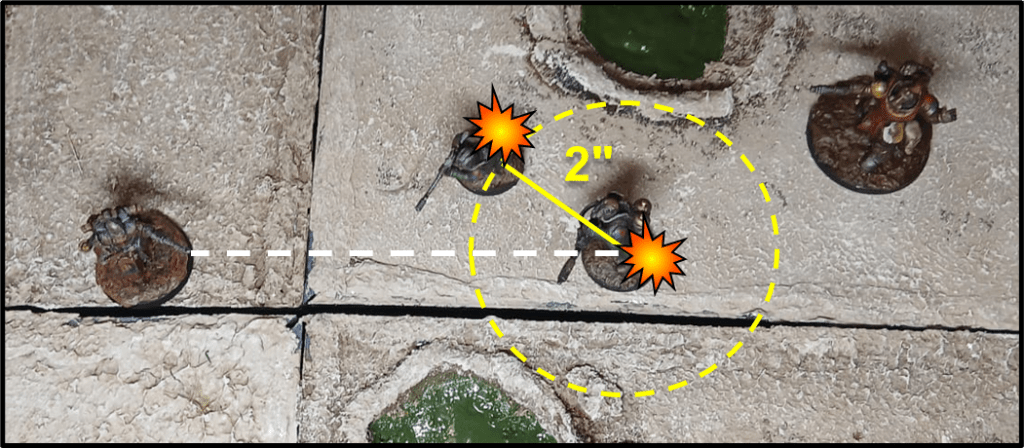
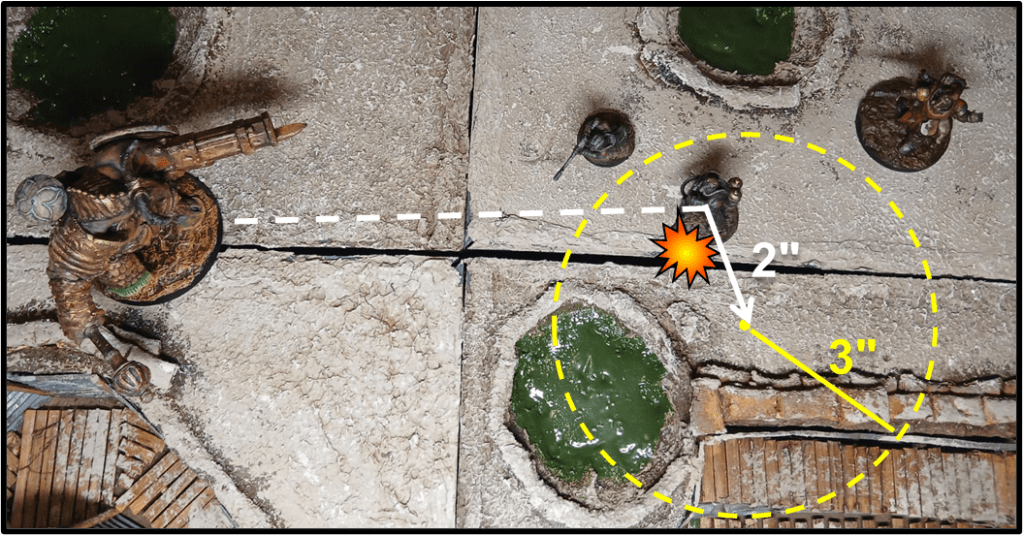
BLAST(X): A Ranged Weapon with BLAST (X”) has a blast radius
in inches equal to X (including vertically). When you make an attack with the  Weapon, you must pick a target for the attack. The target can either be an enemy  model or a visible point on the battlefield or on a terrain piece; whichever you choose must be within the attacking model’s Line of Sight and the Weapon’s  range. If the Success Roll for the attack is a Failure, the attack misses and  nothing happens unless the weapon also has the SCATTER Keyword  (▶ see SCATTER). If the Success Roll for the attack is a Success or Critical Success, every model that has a Line of Sight to the target of the attack and which is within the Weapon’s blast radius is hit. In addition, friendly models that are within 1” of an enemy model that was hit by the blast radius are also hit. Measure the blast radius from the centre of the target model’s base, or the centre of the visible point you picked, to the closest point on the other model’s base. Make an Injury Roll for every model that was hit. If you roll a Critical Success, only add the extra INJURY DICE to the roll for a model if it was chosen as the target of the attack.
When using a BLAST weapon, choose a target model or point and roll to hit as normal. If you hit, all models, friend or foe, within X” of the center of the BLAST (which is the center of the target’s base on attacks that target a model), are hit and suffer an injury roll. As the distance from the centre of the BLAST is also measured vertically, the BLAST itself has the shape of a hemisphere originating in its centre (instead of an infinitely tall cylinder, which you would have if you only considered the horizontal distance from the centre). A model that cannot be seen from the center of the BLAST, for example because it’s behind a wall, is not hit by this attack. When throwing a BLAST weapon into a Melee fight, friendly models within 1″ of an enemy hit by the attack are also hit. This might look weird, but it’s purposedly done to prevent a well-placed attack to surgically hit enemies without any consequences. Roll separately on the Injury Chart for each model hit.
As per normal ranged attack rules, if an attack with BLAST(X) misses, it will have no effect whatsoever. The grenade or shell is a dud, or it lands off-target without doing any real harm, unless the attack also has the SCATTER keyword.
Note that with the April 2026 Playtest rule update, only Ranged Weapons with the BLAST Keyword are able to target a point on the battlefield or on terrain. Grenades can only target an enemy model.
CRITICAL: Add +2 INJURY DICE instead of +1 INJURY DICE when a Critical Success is rolled for an attack made by a Weapon with this Keyword
Remember that all weapons add +1 INJURY DICE to the injury roll on a critical success. The keyword CRITICAL increases this to +2 INJURY DICE. Note that BLAST weapons only grant the +1 INJURY DICE for a Critical Success to models that are directly hit, so the CRITICAL keyword won’t have any effect on models caught in the BLAST radius.
DEADLY: When you make an Injury Roll for an attack made with a weapon with this Keyword, roll 3D6 and add all 3 dice together. Any +INJURY DICE or -INJURY DICE are added to the roll normally, except that you pick the 3 highest or lowest dice in the roll instead of the 2 highest or lowest.
DEADLY weapons are quite rare and devastating, allowing an attack to bypass heavy armour in a way similar to a Bloodbath roll. Note that when making a Bloodbath Roll with a DEADLY weapon, both effects add up and the base Injury Roll becomes 4D6, adding up all 4 dice.
FIRE / GAS / SHRAPNEL: After making the Injury Roll for a Weapon with this Keyword, place 1 extra BLOOD MARKER next to the target model even if the result is No Effect.
Weapons with the keyword FIRE, GAS or SHRAPNEL work in a similar way, adding a BLOOD MARKER to any other injury the weapon causes (including a “no effect” result). This additional BLOOD MARKER is assigned after the injury roll is made, so it cannot be spent immediately to affect the outcome of the roll.
There is no mechanical difference between the three, but different abilities and equipment interact differently with them, most often negating the additional BLOOD MARKER inflicted by one of these keywords (for example a Combat Helmet will negate the BLOOD MARKER caused by SHRAPNEL but won’t have any effect against FIRE or GAS) or applying a modifier to an injury roll caused by that keyword.
While an attack can only have one instance of each keyword (there is no benefit to applying the FIRE keyword to a FIRE attack. It either has the keyword or it doesn’t), different keywords can apply to the same attack and each is cumulative, so for example an attack with FIRE and GAS will inflict 2 additional BLOOD MARKERS on top of the injury result. Note also that against such an attack a Gas Mask would negate the BLOOD MARKER inflicted by GAS but won’t protect against the BLOOD MARKER inflicted by FIRE.
FLAMETHROWER: When a Weapon with this Keyword is used to make a Ranged Attack it is automatically a Success. Do not make a Success Roll for the attack. Note that this means that the attack cannot achieve a Critical Success.
FLAMETHROWER weapons automatically hit the target. Simple as it is. Note that you just skip the Success Roll step of the sequence for making a Ranged Attack, all the other steps apply: declare target, check range and line of sight, so if the target is in melee with a friendly model you still need to determine at random if you are able to hit your enemy.
IGNORE ARMOUR: Ignore -INJURY DICE and -INJURY MODIFIERS for a target’s Armour Characteristic, and for any Armour or Shield pieces of Battlekit that it has, for attacks that have this Keyword.
There’s currently no Battlekit offering -INJURY DICE, at least not as a general modifier. Conditional modifiers against certain types of attack exist, such as those from the Alchemist Armour or the Fire Shield, but these are explicitly listed as not being affected by IGNORE ARMOUR.
IGNORE [MODIFIER]: Ignore the Success Roll or Injury Roll modifier that is specified. For example, the Success Roll for an attack made with a Ranged Weapon that had the IGNORE COVER Keyword would not be affected by the -1 DICE modifier for a target that is in Cover.
Common instances of this keyword are IGNORE COVER, IGNORE LONG RANGE and IGNORE OFF-HAND WEAPON.
RELOAD: If a model makes an attack with a Weapon that has this Keyword then its Activation ends after the ACTION that allowed the attack is completed.
RISKY : If you must make a Success Roll for a model that is using a piece of Battlekit that has this Keyword, then the Success Roll becomes a Risky Success Roll (the model’s Activation will end if the Success Roll is a Failure). For example, the Success Roll for an attack made with a Weapon that has the RISKY Keyword would become a Risky Success Roll. This Effect is ignored if the Success Roll is already a Risky Success Roll.
RELOAD and RISKY are present on some weapons, such as Machine Gun or the Infernal Bombo of the Artillery Witch (RELOAD) or the Sniper Rifle, Sacrificial Blade, the Anchorite Shrine’s Catherine Wheel or the weapons of the War Wold (RISKY). Always take care when using weapons with these keywords, in particular those with RELOAD, as you won’t have the chance to reposition your model after the attack!
SCATTER:  Some Weapons with the BLAST Keyword also have the
SCATTER Keyword. When you make an attack with the Weapon, pick a target  and carry out the attack as described in the rules for BLAST. However, if the Success Roll for the attack was a Failure, the attack will scatter instead of missing.
To see where it scatters to, subtract the Success Roll from 7. For example, if  the Success Roll was 4, then the target point would scatter (7–4=) 3”. Your opponent must move the attack exactly that many inches in a direction of their choice, to a point on the battlefield, on a terrain piece, or on the base of a model.
There must be Line of Sight between the point that is chosen and the original target for the attack. If this is impossible for any reason, then treat the attack as a miss. Then, determine who is hit as described in the rules for BLAST.
On a miss, attacks with this keyword will scatter regardless of whether the target is a model or a point on the battlefield. Note that if the final position of a scattered attack is on a model’s base, the model will be affected by any additional rule the attack gains on a direct hit (such as the Infernal Bomb making a 3d6 Injury Roll).
Model Keywords
Finally, the following keywords are specific to models and grant them additional rules or abilities.
BLESSED(X): When you deploy a model with this Keyword for the first time in a game, place a number of BLESSING MARKERS beside the model equal to X.
A few items and abilities give a model the BLESSED keyword, like the Holy Relic (BLESSED 1) and the Blessing of the Warrior Saint Patron Skill (BLESSED D3).
COVER: A model with this Keyword has the Cover or Defended Obstacle attack modifiers .
A model in can gain the COVER keyword due to items (such as the Heavy Ballistic Shield) or other effects. This grants the same benefits as Cover provided by terrain, but does not stack with them: a model is either in Cover or it isn’t.
DEMONIC: A model with this Keyword has the NEGATE FIRE Keyword.
In addition to the NEGATE FIRE keyword (prevents attacks with the FIRE keyword from applying additional BLOOD MARKERS on the model) some abilities have additional effects or no effect on models with this keyword. Also remember that the Goetic Spells used by models of the Court of the Seven-Headed Serpent cannot be fueled by BLOOD MARKERS taken from models with the DEMONIC or BLACK GRAIL keyword.
FEAR: Add -1 DICE to a Melee Attack that targets a model with this Keyword. Models that cause FEAR are immune to FEAR themselves.
Being in melee combat with multiple FEAR-causing models wouldn’t have any additional effects. On the other hand, the penalty inflicted by FEAR stacks with those caused by a defended obstacle or by a weapon with BLOCK such as a Polearm or a Halberd-Gun.
FIRETEAM: A model with this Keyword is part of a group of two models, both of which must have the FIRETEAM Keyword. You can create Fireteams when you recruit a Warband, and in the Quartermaster Step. Record which models are in Fireteams in your Warband on your Warband Roster. You can Activate friendly models that are part of the same Fireteam simultaneously. If you do so, you can take their ACTIONS in any order you wish, and you can switch between the two models freely. However, if the Activation of either member of the Fireteam ends during a simultaneous Activation (due to a failed Risky Success Roll for example), it immediately ends for the other model that is in the Fireteam too.
When you create your warband, you can also assign any eligible members (e.g. non Mercenaries) to your Fireteams. The number of Fireteams a Warband can create is stated in the respective Warband or Variant description: 2 for New Antioch Warbands, except for the Stosstruppen of the Free States of Prussia which may have up to 3, while 1 for Fida’i of Alamut Warbands. If nothing is listed, then the Warband cannot use FIRETEAMS. Certain models allow you to create 1 or more additional FIRETEAMS, on top of the Warband’s restrictions.
The composition of a Fireteam can only be changed in the Quartermaster Step of the Campaign Phase, and only to create new Fireteams or to assign a new partner to a model that already was in an existing Fireteam if the other member is no longer in the warband.
Activating models as a Fireteam during the battle is not mandatory: you can always activate them individually if you want, and you are free to activate the models separately in one turn and as a Fireteam in another. Note however that once a model has been activated on its own during a turn and you decide to end its activation, its Fireteam partner must be activated on its own as well for that turn.
As the Fireteam rules are also explained in the Principality of New Antioch section of the rulebook, it’s easy to forget that the Concentrated Attack rule, which allows a member of the FIRETEAM to spend only 3 BLOOD MARKERS on the target to trigger a Bloodbath as long as the other member of the Fireteam already hit the target in the same activation, is exclusive to New Antioch Fireteams. Warbands from other factions, though allowed in some situations to use Fireteams, do not benefit from this special rule.

FLYING: When you make a move, retreat move or charge move with a model with this Keyword, you can measure the path on which it travels through the air’. It must end the move on the battlefield or on a terrain piece. You must still take a Risky Success Roll for the model if it is Activated or ends its move on Dangerous terrain, and it cannot end its move on Impassable terrain. In addition do not make an Injury Roll if a model with this Keyword Falls.
FLYING models have additional mobility as they are not forced to follow a path across terrain and can therefore move directly to any point within their movement capability. They are also not subject to the need of taking a Risky Success Roll in order to climb or jump, and can jump down or fall from any height with no risk as they don’t suffer falling damage. For more details about how Flying models work, you can check our previous article about movement and terrain.
GOLEM: A model with this Keyword treats an Out of Action result from the Injury Roll Table as a Down result unless the result was caused by a Bloodbath Roll. In addition, you cannot remove BLOOD MARKERS from a friendly model with this Keyword (the opposing player can use them normally).
Finally, a model with this Keyword has the NEGATE FEAR and NEGATE
GAS Keywords, but cannot have the TOUGH Keyword.
GOLEM creatures are extremely hard to get rid of, being immune to the extra effects of GAS and treating any Out of Action result not obtained though a Bloodbath as a Down instead. That’s right, unlike TOUGH, which only works once per battle, GOLEM can be triggered multiple times as long as the attack is not benefiting from a Bloodbath Roll. The drawback is that the controlling player can’t heal the model in any way, so BLOOD MARKERS on the GOLEM keep on stacking until the enemy decides to spend them. Be aware however that while a Bloodbath greatly increases the chances to take the model Out of Action, it doesn’t guarantee success, and on any other result, you would have to restart the process again.
It’s important to note that a GOLEM can’t have the TOUGH keyword: this is done to prevent excessive resistance stacking on a model. This means that a model obtained through the Book of Golem discovery during Exploration cannot gain the full benefits of the Massive Size formula (it can have its base size increased to 50mm, but no TOUGH)
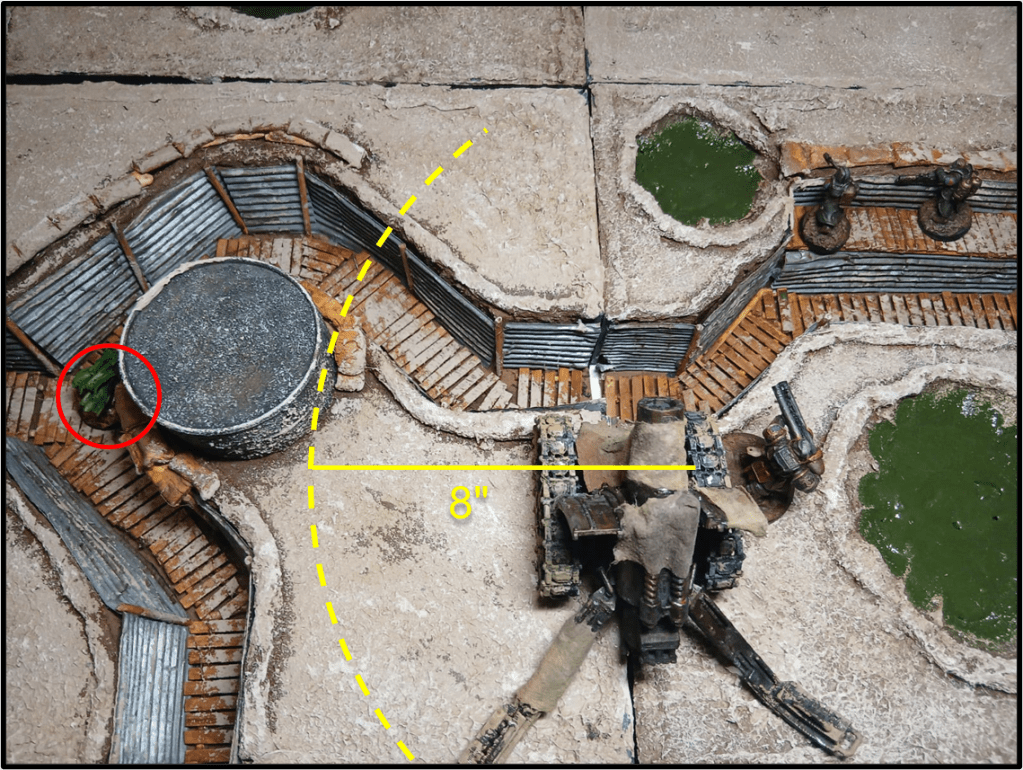
INFILTRATOR: When a model with this Keyword is deployed for the first time in a game, it can be set up anywhere on the battlefield as long as it is out of the Line of Sight of all enemies and is at least 8" away from the closest enemy. INFILTRATORS are deployed after models that do not have this keyword. Any INFILTRATORS that cannot be deployed in this way are instead deployed normally in their deployment zone.
Scenario rules will specify whether INFILTRATORS can deploy using the benefit granted by this keyword (sometimes with additional restrictions, e.g. “INFILTRATORS cannot be deployed within 8″ of an Objective Marker”) or if they must be deployed as regular troops.
As clarified in the rulebook itself, “deployed after models that do not have this keyword” means after all non-INFILTRATOR models (not just the ones in your Warband). This means that, when INFILTRATORS are involved, there is a first deployment round, where players alternate in deploying all non-INFILTRATOR models, and a second round of deployment, alternate as well, only for INFILTRATORS. In this second round, the player who did not deploy last in the previous round will start deploying one of their INFILTRATORS.
Note that some models, like the Mamluk Faris, Abyssinian Vanguard Yeomen or Fida’i Assassins with the Secret Path ability, may have some special deployment rules. Unless otherwise specified, neither of these models is considered to be using the INFILTRATOR keyword when deploying through one of these abilities, and the ability itself will specify when it can be used, and how these interact with scenarios that do not allow deployment via INFILTRATOR.
LEADER: Add +1 DICE to Morale Checks if your Warband has at least 1 model with this Keyword on the battlefield that is not Down or Out of Action.
Currently, the LEADER keyword is possessed by (1) models carrying Troop Flags and equivalent items or (2) models that are mandatory when a Warband is first created (namely Heretic Priest, Yüzbaşı, War Prophet, Lieutenant, Lord of Tumours and Praetor).
This makes it so that some warbands or variants can start a campaign without any model with LEADER (e.g. Court of the Seven-Headed Serpent or Papal States Intervention Force), while others, such as Fida’i of Alamut, House of Wisdom, or any Black Grail warband without a Lord of Tumours, can only acquire this effect by purchasing a Troop Flag.
It’s important to note that having multiple models in play with the LEADER keyword does not provide additional benefits other than a backup Leader in case one is Down or Out of Action.
NEGATE [KEYWORD]: A model with the NEGATE Keyword is not affected by the specified Keyword’s Effect. For example, a model with NEGATE SHRAPNEL ignores the Effect of the SHRAPNEL Keyword.
Note that only the effects of the negated Keyword are ignored, any other keywords or effects of the attack still apply. For example a model with a Gas Mask (NEGATE GAS) will not suffer the additional BLOOD MARKER from the GAS keyword of a Gas Grenade, but the IGNORE ARMOUR and -1 INJURY DICE keywords of the attack still apply.
REGENERATE (X): When you Activate a model with this Keyword, before carrying out any ACTIONS, you can remove up to X BLOOD MARKERS from the model.
Model with REGENERATE are hard to hinder because they will quickly heal any BLOOD MARKER they suffer, so you’ll need to inflict at least 2 in order to have a chance to penalize their actions. Note that this Keyword only works against BLOOD MARKERS: INFECTION MARKERS cannot be regenerated.
SKIRMISHER: If an enemy selects a model with this Keyword as the target of a Charge, you can choose to evade with your model before the Charge is made, as long as your model is not within 1" of an enemy. When a model evades, roll a D3 and move the model that many inches. It must finish this move more than 1" away from all enemy models.
The most obvious use of the keyword SKIRMISHER is to make a long-distance charge fail by retreating outside the charge range, but it can have other uses, for example you could move the SKIRMISHER model towards the charging enemy to intercept their charge outside the control range of an objective, or to protect another more valuable model from being charged. Also note that if the SKIRMISHER model uses this ability to move out of the attacker’s Line of Sight, this doesn’t prevent the charge, as the model was visible when the charge was declared.

STRONG: A model with this Keyword is not affected by Battlekit with
the Keyword HEAVY. In addition, it can use one 2-Handed Melee Weapon as if it were a 1-Handed Melee Weapon.
To break it down a bit more STRONG serves two main purposes:
- Ignore the effects of the HEAVY keyword: a STRONG model can have any number of HEAVY items (which usually translates into a HEAVY melee and a HEAVY ranged weapon) and more importantly, it can move/dash and fire with any weapon, and gain the Charge Bonus, regardless of which items it is equipped with, thus being a lot more mobile.
- Wield a single two-handed melee weapon (regardless of whether it’s HEAVY or not) in one hand, thus leaving the other hand free to wield another 1-handed weapon, shield or HELD item.
Note that the latter doesn’t apply to CUMBERSOME weapons, which always count as two-handed regardless of any ability their wielder may possess.
TOUGH: The first time a model with this Keyword suffers an Out of
Action result on the Injury Table, it is treated as a Down result instead.
And finally the alphabetical order brings us to TOUGH. This keyword allows a model to survive the first Out of Action result it suffers during the battle, converting it into a Down effect. Note that the model would suffer BLOOD MARKERS as if the Down result was rolled on the Injury Table (so 1 BLOOD MARKER, or 2 markers if the model was already Down when the injury roll was made).
As per the Trench Crusade FAQ, If an effect would further transform a Down result the model suffers into a Minor Hit or No Effect result, that would combine with the effect of TOUGH, so for example a TOUGH model in Machine Armour would treat the first Out of Action result it suffers as Minor Hit instead (and TOUGH would count as being used).

And that’s it for the core rules of the game. Now all that’s left is taking a look at warband creation, scenarios and campaign rules. Until then, stay safe, keep your head down and your feet dry!



Leave a Reply