Hello everyone! Welcome back to the Troll’s den. After a general introduction to Trench Crusade, it’s now time to delve a bit more into detail and see how the game works. Fortunately for us, it’s not really complicated, but there are some fine details that can be missed at first read. We’ll start with the basics: how to set up a game, how to activate models and how to resolve dice rolls.
A game of Trench Crusade is played across a number of Turns. During each Turn, players will alternate activating all their models until each has been activated once. The Scenario you are playing dictates how many Turns it will last, usually a set number between four and six, with some Scenarios having a random chance of lasting longer.
Game Setup

Each game is preceded by a Set Up sequence, in which the following steps are performed:
- Players select the Scenario they are going to play. Depending on the situation (campaign or one-off games) there could be rules on what scenario can be selected and which player (if any) chooses.
- Players set up the Battlefield according to the Scenario rules, adding terrain features that will affect the movement of their models and their line of sight, objective markers and any other item required by the Scenario (some times objectives will be placed after players have picked their deployment zone). Without going too deep into detail about terrain, it’s important to note that having dense boards with lot of cover and areas where models can be safe from enemy fire, particularly in the center of the battlefield, is generally considered a good thing, as otherwise long range weapons tend to dominate the scene.
- Players will pick their deployment zone according to the Scenario rules. Some scenarios will have one player as the Attacker and the other as the Defender, with set deployment zones and special rules for each, while in other situations players will be more free to choose their deployment zone.
- Players will choose the models from their warband that will take part in the battle (known as the players Force) as instructed by the Scenario. Not all scenarios foresee the use of your full warband, sometimes only a set number of models can be used.
- Players will have a chance to perform Pre-Game Activities, one at a time. Pre-Battle Activities are those effects that will take place before the battle, such as using Martyrdom Pills or breaking a volunteer on the Catherine Wheel of an Anchorite Shrine. Each activity will dictate when it resolves. In case of simultaneous activities players will roll-off and the winner will decide what order they are resolved in.
- Models will be deployed according to the scenario rules. The standard form of deployment is an alternate placement of models starting with the player whose warband is the most numerous, but some Scenarios may present some alternatives, such as some models being forced to enter the battle at the beginning of the second Turn, or only after certain conditions verify. Models with special abilities like the INFILTRATOR keyword can be deployed in advanced positions, unless the Scenario rules say otherwise.
- The first Turn of the battle begins.
The Turn Sequence
Each Turn in Trench Crusade is divided into three phases:
- Initiative Phase: The player with the lowest number of standing models currently in play (so excluding models who are Down, Out of Action or out of the battlefield) will have Initiative for the turn. If both players have the same number of models, roll-off to determine who gains Initiative. The player with Initiative will determine who will activate first in the Activation Phase, and will decide which order simultaneous effect will be resolved in.
- Activation Phase: Starting with the player chosen by whomever has Initiative, each player chooses one of their models in play that hasn’t been activated this turn and activates it, performing ACTIONS one at a time until the model has no more ACTIONS to take, the player decides to end the activation or an effect (such as failing a Risky Success Roll) forces the end of the model’s activation. Then the opponent does the same with one of their models and so on, until each model has been activated once.
- It is possible that one player has activated all of their models while the opponent still has models to activate. If this happens, the latter will activate their remaining models one at a time.
- Morale Phase: Your Warband might need to take a Morale Check to see if they stand and fight or they are forced to retreat due to the casualties they suffered. In most Scenarios, failing a Morale Check will cause the warband to succumb to panic and become Shaken. A Shaken warband will operate less effectively for one Turn, and has to make another Morale Check to avoid retreating from the battlefield in the next turn. After checking for morale, effects that trigger “at the end of the turn” are resolved and a new Turn begins from the Initiative Phase.
Actions
When a model is activated, it can perform any number of ACTIONS it has access to, in any order, as long as the following limitations are respected:
- The model cannot perform the same ACTION more than once per Turn.
- Unless otherwise specified, all ACTIONS require a Success Roll in order to be successfully executed. The most notable exceptions are the Move, Charge and Retreat ACTIONS which require no roll.
- Each ACTION is completely resolved before attempting another ACTION.
Note that, as a general rule, no ACTION is mandatory, so it is perfectly legal to activate a model and have it perform no ACTION.
When making a Success Roll to see if an ACTION is successful, the player takes 2 six-sided dice (2D6), applies any relevant +/- DICE modifiers (see the section on Modifiers below for details) and rolls the resultant number of dice, totaling the two highest (in the case of +DICE) or lowest (in the case of -DICE) scores obtained. The outcome of the roll is then compared to the Success Table as follows:
- A roll of 6 or less represents a Failure. The model does not perform the action. If the Success Roll was Risky (see below), the model’s turn immediately ends, otherwise the model can proceed in resolving other ACTIONS, if they have any available (but may not attempt the failed ACTION again this Turn).
- A roll of 7 or more is a Success. The model can perform the ACTION as described in its rules. If it was an Attack ACTION, you’ll roll on the Injury Chart to see what happens to the target (Fear not, I will detail how the Injury Chart works in a later article).
- When making an Attack ACTION, a roll of 12 or more is a Critical Success. The roll on the Injury Chart is made with a +1 DICE modifier.
Some ACTIONS require a Risky Success Roll. When taking one of these ACTIONS, you resolve it as normal, but if the dice roll results in a failure (i.e. you rolled 6 or less), the model’s activation immediately ends. Note that when an effect turns a Success Roll into a Risky Success Roll (such as the RISKY keyword some weapons have, or the Herald of Beelzebub’s Maddening Buzz ability) you don’t need to make an additional roll to see if you can perform the ACTION, it’s the roll you would normally take that will cause the model’s activation to end in case of a failure. This also mean that ACTIONS that automatically succeed, such as Move, won’t carry any risk of ending your model’s activation.

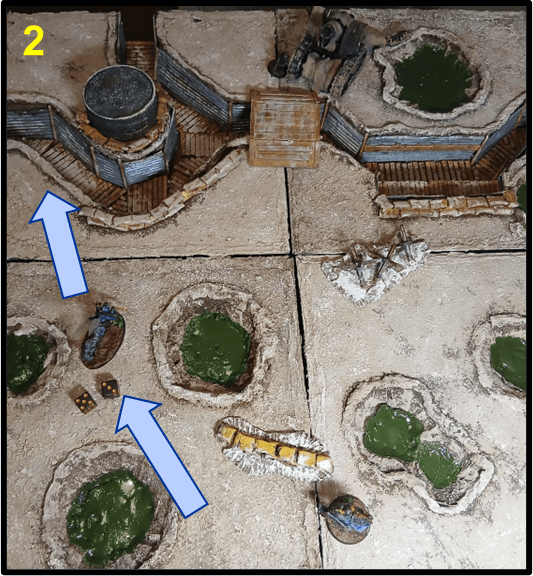
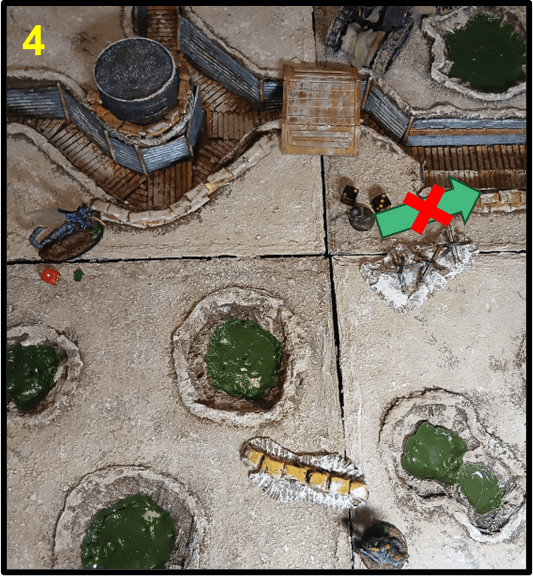
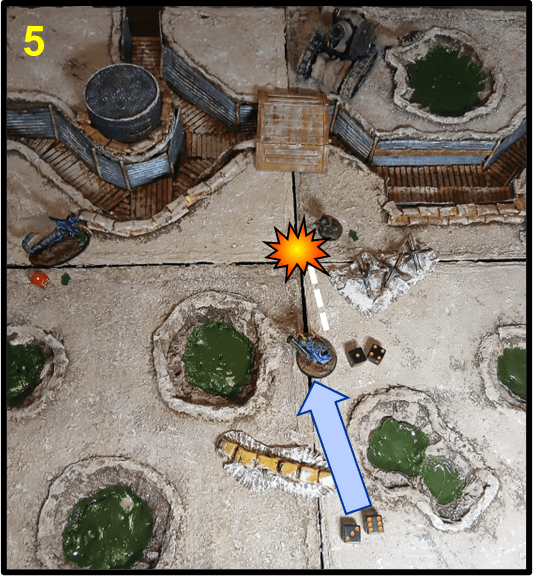

1) Brave Yeoman Geoff (A) is facing a Pit Locust (B) and a Hell Knight (C). It’s the Court player’s turn to activate a model.
2) The Pit Locust activates, taking a Move ACTION, which automatically succeeds without the need to roll, and then successfully attempts a Dash ACTION to move a second time.
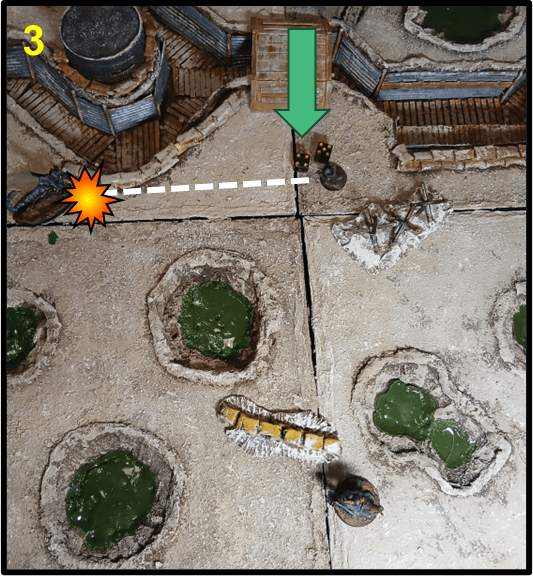
3) It’s the turn of brave Yeoman Geoff. He takes a Move ACTION to move into position, then takes a Shoot ACTION to make a Ranged Attack with his Bolt-Action Rifle against the Pit Locust. He manages to hit his target, however the armour of the Locust is too hard to crack, and the shot doesn’t do damage.
4) Next Geoff attempts to move back with a Dash ACTION, but he is unlucky, rolling only a 5. As Dash requires a Risky Success Roll, the Yeoman’s activation is immediately over.
5) It’s finally turn for the Hell Knight to act. It opens with a successful Dash ACTION, moving forward, then it attempts to lob a Gas Grenade at Geoff with a Ranged Attack from its Shoot ACTION, but misses.
6) As the Gas Grenade has ASSAULT, the Hell Knight can use a Charge ACTION to engage the Yeoman in the same turn, reaching the Yeoman and attacking him in Melee with a Fight ACTION. The Knight’s attack roll is a 12. Critical Hit! Watch out Geoff!
Common Actions all models have access to are movement ACTIONS (Move, Charge, Retreat and Dash) and, depending on the equipment, attack ACTIONS (Shoot and Fight). Abilities, equipment and scenario rules can provide additional ACTIONS that the model can take in addition or instead of other ACTIONS, and can sometimes allow a model to repeat an ACTION they have already taken during the current Turn.
- Move, Charge, Retreat: These ACTIONS allow a model to move around the battlefield. They don’t require a Success Roll to be performed
- Move: The model can move a number of inches up to its Movement characteristic in any direction, but it cannot move within 1″ of an enemy if it wasn’t already within 1″ of it at the beginning of the movement.
- Charge: Choose one or more enemies within 12″ of the model and in its line of sight. The model moves towards them a number of inches up to its Movement characteristic +D6, following the shortest, most direct path available. If this movement brings the model within 1″ of the chosen enemies, they are now locked in Melee Combat and can use Fight ACTIONS to attack with its Melee Weapons.
- Retreat: The model can move as if taking a Move, but it can also leave Melee Combat if it started it activation within 1″ of an enemy. When this action is declared, however, all enemies in Melee Combat with the model can make a Melee Attack against it before it has a chance to move away.
- Dash: This ACTION requires a Risky Success Roll to be performed. If it’s successful, the model moves following the same rules for a Move ACTION. As it is a different ACTION than Move, it is not considered a repeated ACTION so it can be taken in the same activation, effectively allowing a model to move twice, potentially interposing other ACTIONS, such as attacks, between the two movements.
When making a Move or Dash ACTION, a model can also find itself in need to navigate across terrain. Unless the model has the ability to Fly, Difficult Terrain will slow them down, while Dangerous Terrain could potentially deal damage. The Climb and Jump options are useful tools that will help cross terrain elements without losing too much time moving around them, pending a successful Risky Success Roll. A model can Climb and Jump multiple times in the same turn, and these options are also allowed during a Charge, but they are not mandatory. If the shortest path during a Charge would force the model to make a Climb or Jump, or to cross Dangerous Terrain, the model could Charge by the shortest path that moves around the terrain instead.
- By passing a Risky Success Roll to Climb, the model can move up or down a vertical surface, spending vertical movement as part of its available movement for the action, but must end the movement on a horizontal surface that can sustain at least half of its base. If the roll is failed, the model ends its activation just right before the climb, in contact with the surface it intended to climb. Not all vertical surface require climbing, ladders for examples can be moved up or down as normal terrain, and so is climbing out of trenches up to 3″ high, as it is assumed they all have fire steps and footholds for the occasion, while obstacles up to 1″ in height can be crossed without rolling.
- By passing a Risky Success Roll to Jump, the model can cross gaps wide up to half its Movement value and continue to move. Failure will cause the model to fall into the gap and potentially be injured.
- Shoot: Models armed with Ranged Weapons and/or Grenades can make a Shoot ACTION in order to make a Ranged Attack against an enemy they can see and that is within the range of the weapon. The Ranged characteristic of the model will modify the attack, as well as situational modifiers such as elevation, cover and long range. If the attack is successful, you’ll roll on the Injury Chart to see if the target has suffered any damage. Common limitations to Shoot ACTIONS include the following:
- A model armed with multiple Ranged Weapons can still only use one of them per activation to make a Shoot ACTION. Note however that some rapid fire weapons allow for multiple attacks (see the AUTOMATIC keyword). In that case, each shots is resolved individually, one after the other, with no other ACTIONS possible between them unless a special rule specify it.
- A model cannot take a Shoot ACTION and take a Charge or Fight ACTION in the same activation (in any order) unless it uses a ranged weapon with the keyword ASSAULT.
- A model equipped with a HEAVY Ranged Weapon or Grenade cannot make a Shoot ACTION with that weapon and take a Move or a Dash ACTION in the same activation (in any order), unless it is STRONG.
- A model that is within 1″ of any enemy cannot make a Shoot ACTION.
- A model can make a Shoot ACTION that targets an enemy engaged in Melee combat, but there is the risk of friendly fire: each attack has a 50% chance of hitting a friendly model involved in the melee and a 50% chance of hitting an enemy model.
- Fight: A model equipped with one or more Melee Weapons can use a Fight ACTION to make Melee Attacks. Melee Attacks work in a similar fashion as Ranged Attacks, but they will be modified by the Melee characteristic of the model.
- Unarmed fighters: A model without Melee Weapons cannot make a Melee Attack unless it has a special rule that allows it to do so.
- Fighting with two weapons: A model equipped with two one-handed Melee Weapons can use them to make two Melee Attacks in the same Fight ACTION. The model can choose the order in which weapons will be used to attack. The second weapon used is the Off-hand Weapon and will suffer a -1 DICE penalty to Success Rolls.
Actions Modifiers: +/- DICE
All Success Rolls can be modified by many factors, such as:
- Characteristics and abilities of the model taking the ACTION;
- Weapons, Armour and Equipment carried by the model or the target;
- Abilities of the model targeted/affected by the ACTION or of any other model nearby;
- BLOOD MARKERS and BLESSING MARKERS on the model performing the ACTION (see below);
- Terrain effects;
- Scenario rules;
Regardless of the source, all modifiers to Success Rolls come in the form of “+ x DICE” or “- x DICE” and follow the same rules.
+/- DICE modifiers represent extra six-sided dice (D6) the player can roll in addition to the usual two. The outcome of the Success Roll will be determined by the sum of 2 of the dice rolled, either the 2 highest (in case of + DICE) or the 2 lowest (in the case of – DICE). For example, “+2 DICE” can be read as “roll 4D6 (2 base + 2 for the modifier) and sum the 2 highest values”, while “-1 DICE” means “roll 3D6 (2 base, +1 for the modifier) and sum the 2 lowest values”. Note that in the case of – DICE, the modifier dice are still added to the rolled pool.
+/- DICE modifiers are cumulative. If a Success Roll is subject to both +DICE and -DICE at the same time, they cancel each other in pairs and the final modifier is equal to the difference between the two.

Example: a Yüzbaşı Captain takes a Shoot ACTION and makes a Ranged Attack with a Halberd-Gun (Range: 24″) loaded with Alchemical Ammunition, targeting a Heretic Priest. The Priest is behind a terrain that provides Cover and is 17″ away. The Heretic player wants to ensure the attack has a higher chance of missing, so they spend 2 BLOOD MARKERS that were on the Yüzbaşı to further hinder its attack. The overall modifier to this Success Roll is calculated as follows:
- +2 DICE for the Ranged characteristic of the Yüzbaşı;
- +1 DICE for the effect of Alchemical Ammunition;
- -1 DICE for the target being in Cover;
- -1 DICE for firing at a target at Long Range (more than 50% of the weapon’s maximum range);
- -2 DICE for the BLOOD MARKKERS spent by the opponent.
The total modifier is +2 +1 (-1 x 4) = -1 DICE. The player controlling the Yüzbaşı rolls 3D6 and will need to obtain 7 or more on the two lowest results (as the modifier is negative) in order to hit. The Sultanate player rolls 3 dice, obtaining a 2, a 3 and a 5. As the sum of the two lowest results is less than 7, the attack misses!
Blood and Blessing Markers
Wounds, fatigue and trauma a model accumulates during the battle are represented by BLOOD MARKERS. We will describe more in detail how BLOOD MARKERS are gained and used in a future article, what is important for today’s discussion is the fact that when a player makes a Success Roll with a model, their opponent can use Blood Markers on that model to hinder the action. Before taking a Success Roll the opponent can declare if they want to use BLOOD MARKERS this way and how many they want to use. Those markers are discarded, and each is converted into a -1 DICE modifier to the Success Roll.
Much less frequent than BLOOD MARKERS, BLESSING MARKERS have a similar but opposite effect, representing a morale boost, blind faith, chemical enhancements or a supernatural intervention. When performing a Success Roll with a model that has any BLESSING MARKERS, the player controlling that model can, before rolling, discard one or more of those Markers to gain a +1 DICE modifier to the roll for each marker spent.
Should a model have both BLOOD and BLESSING MARKERS, the player with Initiative can decide who would need to spend any MARKERS first.
Morale Phase
We covered pretty much everything that happens during a Turn; in future articles we’ll discuss in detail how the various ACTIONS work and interact together. Before leaving, however, I need to address what happens after every model has been activated.
Before the end of the turn you’ll need to check whether your warband is required to take a Morale Check: if more than 50% of the models in your warband are still standing, no test is required and you’ll be able to fight for another turn.
However, if 50% or more of the models in your warband (rounded up) are Down or Out of Action, you need to take a Morale Check. This is a Success Roll that is not performed by any model in particular (so it cannot be modified by BLOOD MARKERS or other effects, except for those who explicitly affect Morale). If the test is successful, nothing happens. On a failure, however, your Warband’s morale will falter, and you have to choose one:
- The Warband flees and immediately loses the game
- The Warband will be Shaken for the next Turn.
During a Turn in which a Warband is Shaken, all Success Rolls its model are called to make become Risky Success Rolls, meaning failing one will end that model’s Activation (remember that ACTIONS that automatically succeed, like Move, don’t need a roll, even in this situation). In addition, a Shaken Warband will have to make another Morale Check at the end of the Turn (even if more than 50% of its models are Standing): in case of a failure, the warband will flee and the player will lose the game.
And with that, I think that we covered everything we needed to in order to get a basic rundown of the game sequence and actions. Thanks for staying with me all along. There are some details missing but, as mentioned, we’ll get back to them in future posts. Next time we’ll talk about movement and terrain. Until then, heads down and watch out for Infernal Bombs!

 A Troll in the Trenches
Leave a comment